100% Free & Open Source
Your Data Stays On Device

Advanced Sentry Mode
for Your BYD

The only BYD dashcam app with <28% CPU usage thanks to state-of-the-art optimization. While competitors hit 90%+ CPU, we keep your head unit cool and responsive.

<28% CPU Usage
4K Recording
24/7 Sentry Mode
FREE Forever
OverDrive Dashboard

Built Different

See how we compare to other dashcam apps in the market

Feature OverDrive Other Apps
CPU Usage <28% 70-90%
Recording Architecture Optimized Pipeline CPU-based encoding
Proximity Recording ✓ Market First ✗ Not Available
Real-time Performance Monitor ✓ Built-in ✗ None
ISP Blocklist Bypass ✓ Via BYD SIM ✗ Requires WiFi Hotspot
Remote Access Options 3 Methods (LAN, Cloudflared, Zrok) Usually 1 (if any)
ADB Shell Runner ✓ Developer Tools ✗ None
Telegram Notifications ✓ Free Paid or None
Data Privacy 100% On-Device Often Cloud-Required
Price FREE Forever $5-50/month

Everything Your BYD Needs

Built specifically for BYD vehicles with deep system integration

Optimized Recording Pipeline

State-of-the-art architecture designed for efficiency. Our optimized pipeline keeps CPU usage minimal while delivering smooth, high-quality recordings.

<28% CPU Usage
~150MB Memory
<3s Boot Time
Market First

Proximity Recording

Uses BYD's 8 parking radar sensors to detect approaching objects. Records pre/post event clips only when something gets close — saving storage and resources.

  • Configurable trigger levels (Yellow/Red)
  • Pre-event buffer (captures before trigger)
  • Post-event duration (configurable)
  • 500ms debouncing to prevent false triggers

Real-time Performance Monitor

Dedicated dashboard showing CPU, GPU, memory usage, and battery voltage. Know exactly what resources your system is using.

Advanced Sentry Mode

24/7 surveillance with motion detection and AI object recognition. Keeps your vehicle protected while parked.

ISP Blocklist Bypass

Browse internet via BYD's built-in SIM card, bypassing ISP restrictions. No dedicated WiFi hotspot needed. Optional paid feature as server costs grow.

ADB Shell Runner

Built-in terminal for developers. Run shell commands, check process status, view logs, and debug directly from the app.

Watch Your Car From Anywhere

Three flexible options for remote access — choose what works for you

Local Network (LAN)

Easiest

Connect when you're on the same WiFi network as your car.

http://<car-ip>:8080
  • ✓ Zero setup required
  • ✓ Fastest streaming (local network)
  • ✓ No external dependencies
⚠️ Only works on same network

Cloudflare Tunnel

Quick Setup

Access from anywhere via Cloudflare's global network. No port forwarding needed.

https://<random>.trycloudflare.com
  • ✓ No configuration needed
  • ✓ Works from anywhere
  • ✓ HTTPS by default
⚠️ Video streaming can be slow Cloudflare Limitations →

Real-time Alerts via Telegram

Get instant notifications when motion is detected, recording starts, or battery gets low. Completely free using Telegram's bot API.

Setup in 2 Minutes

  1. Create a bot: Message @BotFather on Telegram /newbot → Follow prompts → Get your bot token
  2. Get your Chat ID: Message @userinfobot /start → Copy your ID
  3. Configure OverDrive: Settings → Notifications → Enter bot token & chat ID
🚗 OverDrive Bot ⚠️ Motion detected on Front camera
📍 Recording started: event_20260121_143052.mp4
2:30 PM

Your Data Never Leaves Your Device

Unlike cloud-based dashcam services, OverDrive keeps everything local. Your recordings, your GPS data, your privacy.

  • 100% Local Storage — All recordings saved on device or USB
  • No Account Required — Use the app without signing up
  • No Cloud Upload — Remote viewing is direct P2P via tunnels
  • Open Source — Audit the code yourself on GitHub

See It In Action

Real screenshots from the app running on BYD vehicles

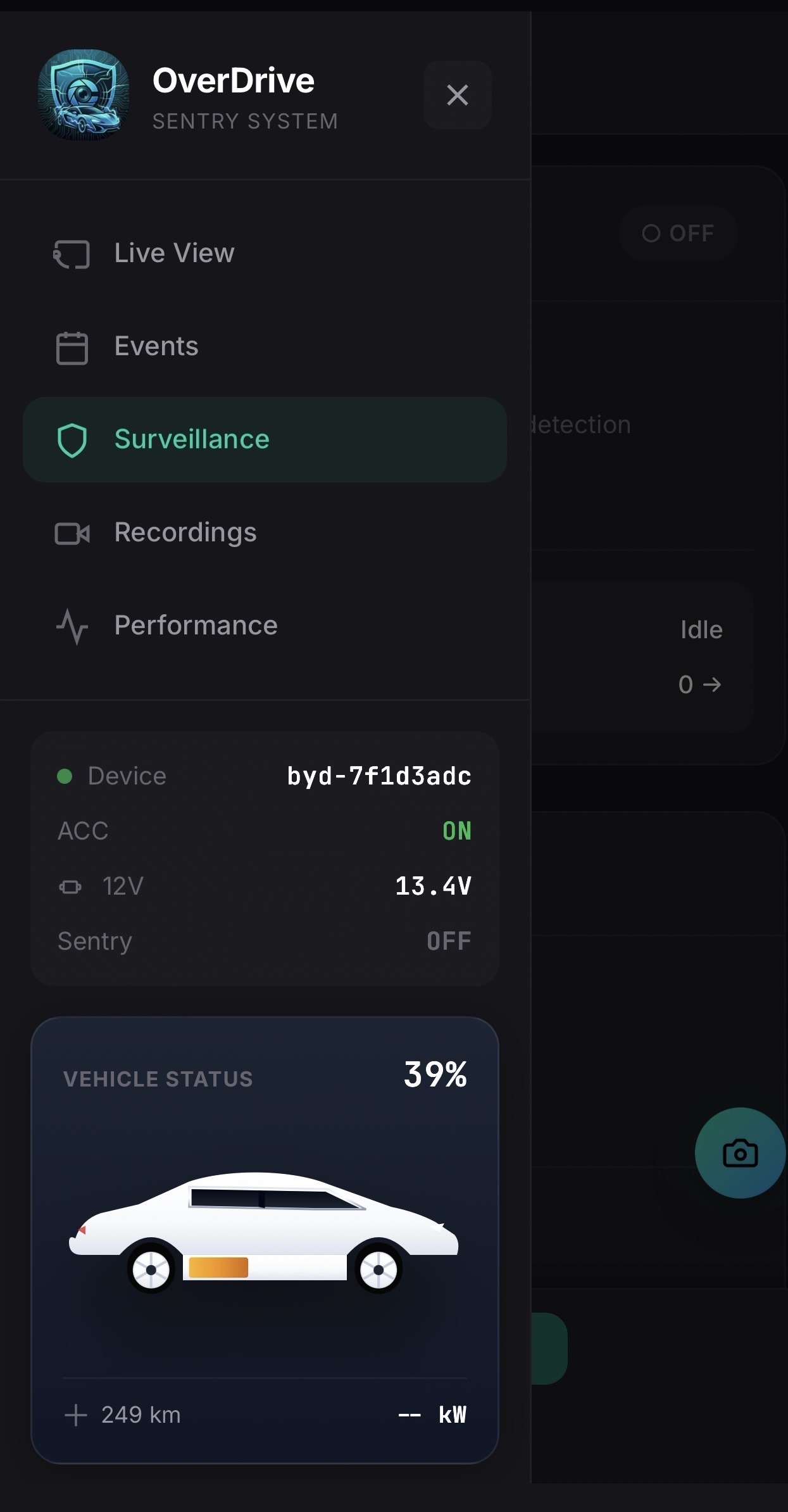
Dashboard & Sidebar

Dashboard & Navigation

Clean sidebar navigation with quick access to all features. Monitor daemon status, battery voltage, and system health at a glance.

  • Quick daemon controls
  • 12V battery monitoring
  • EV battery & charging status
  • Easy navigation to all features
Live View

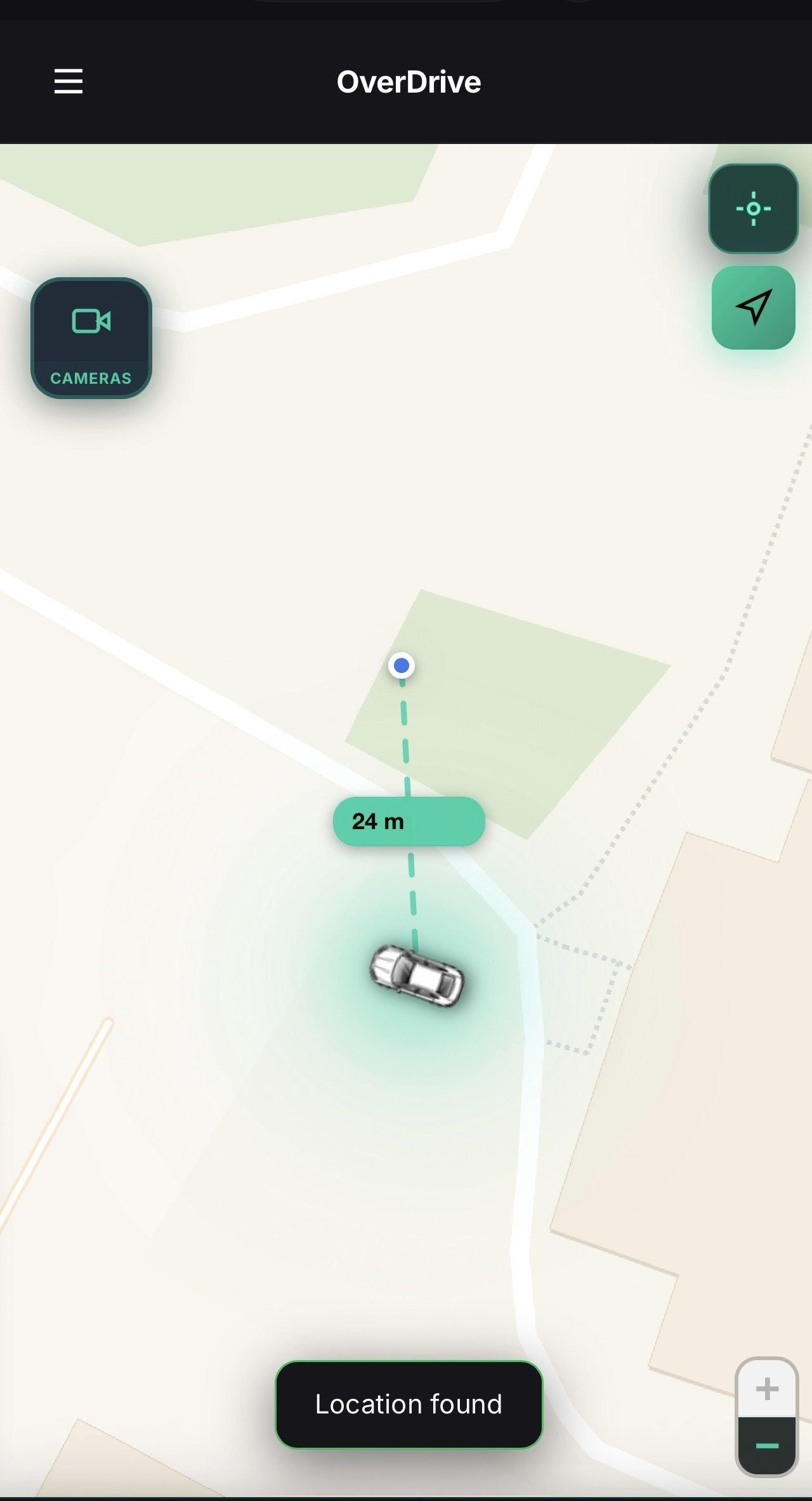
Live View with Location

Real-time camera feed with vehicle location overlay. See exactly where your car is while monitoring the surroundings.

  • Live camera streaming
  • GPS location display
  • Vehicle position on map
  • Remote viewing support
Camera View

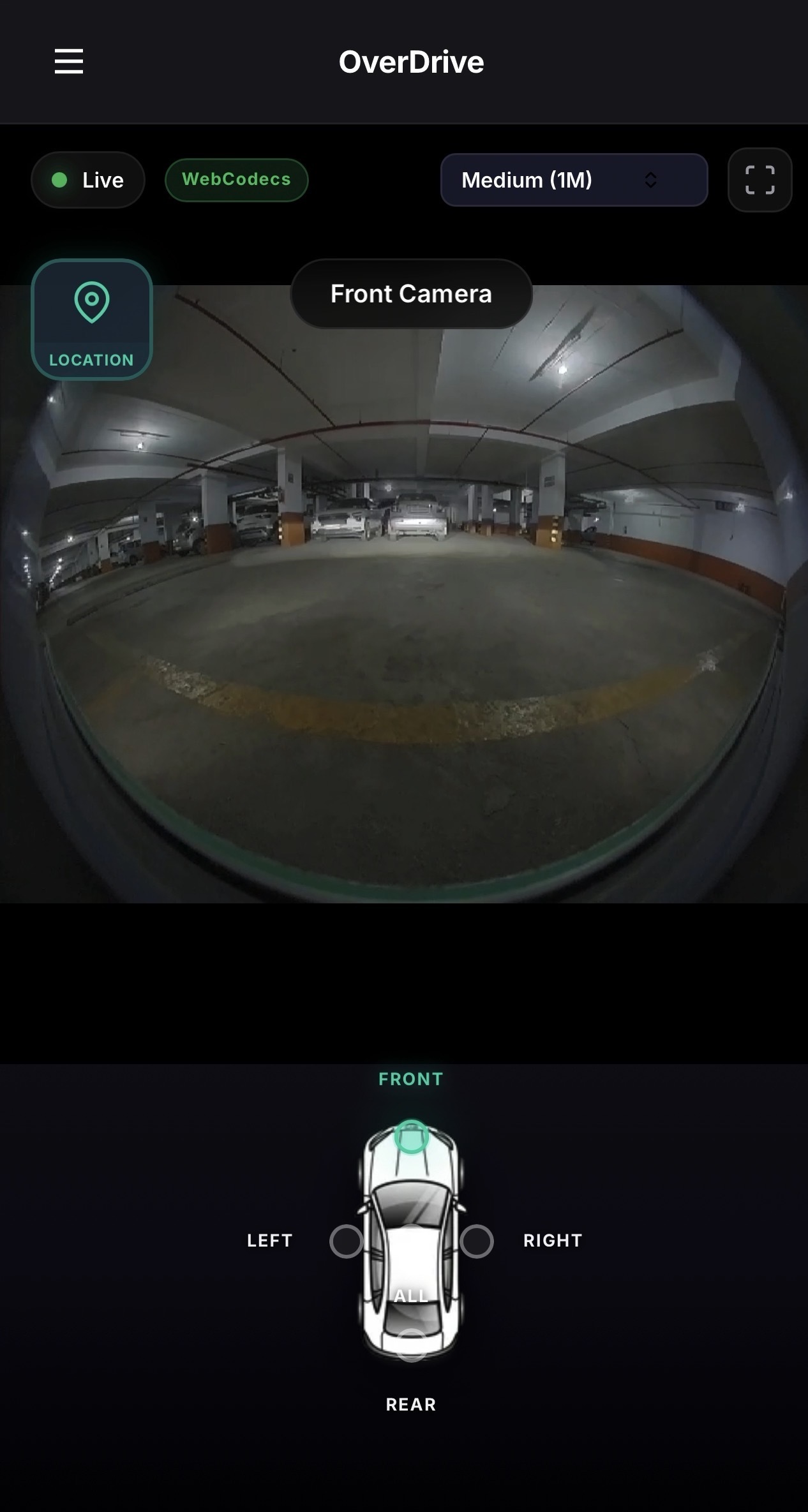
Camera View

Full-screen camera preview with recording controls. Switch between cameras and start/stop recording with one tap.

  • Multi-camera support
  • Recording controls
  • Camera switching
  • Full-screen mode
Surveillance Settings

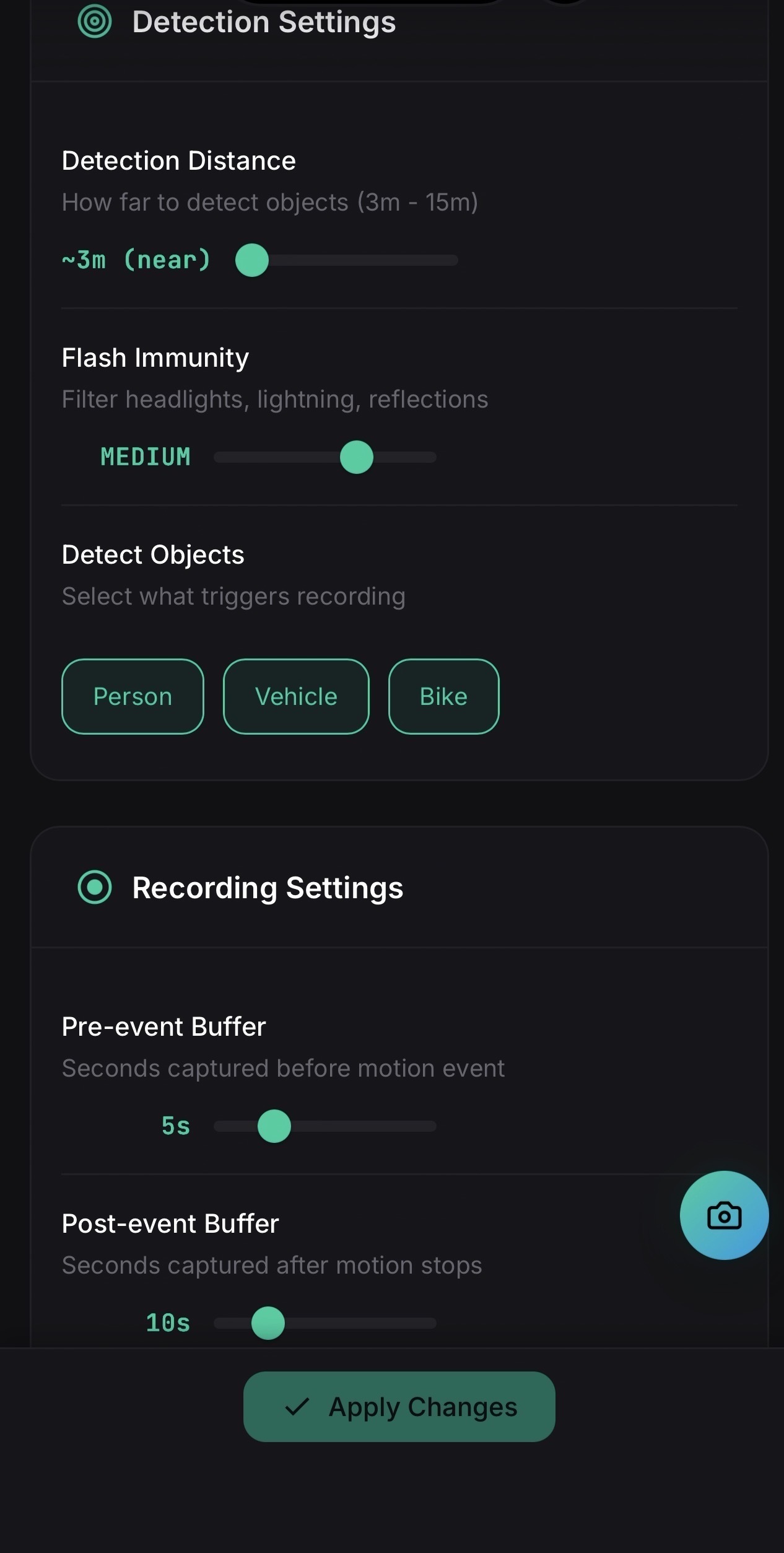
Surveillance Settings

Configure your sentry mode with detailed options. Set motion sensitivity, recording duration, and notification preferences.

  • Motion sensitivity control
  • AI detection settings
  • Pre/post event recording
  • Notification configuration
Proximity Guard

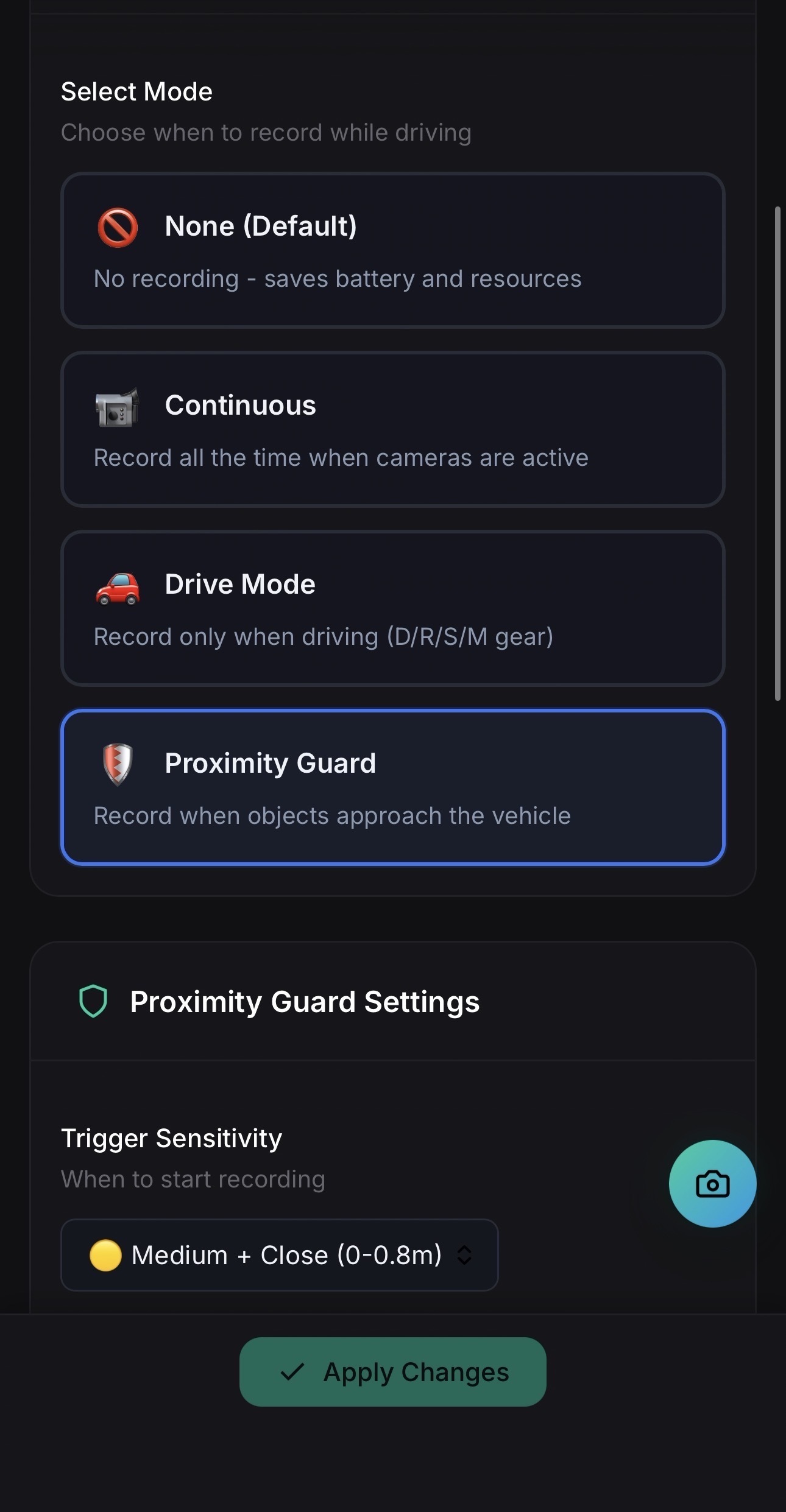
Proximity Guard

Configure proximity-based recording using BYD's parking sensors. Only record when something approaches your vehicle.

  • Radar sensor integration
  • Configurable trigger levels
  • Pre-event buffer
  • Smart debouncing
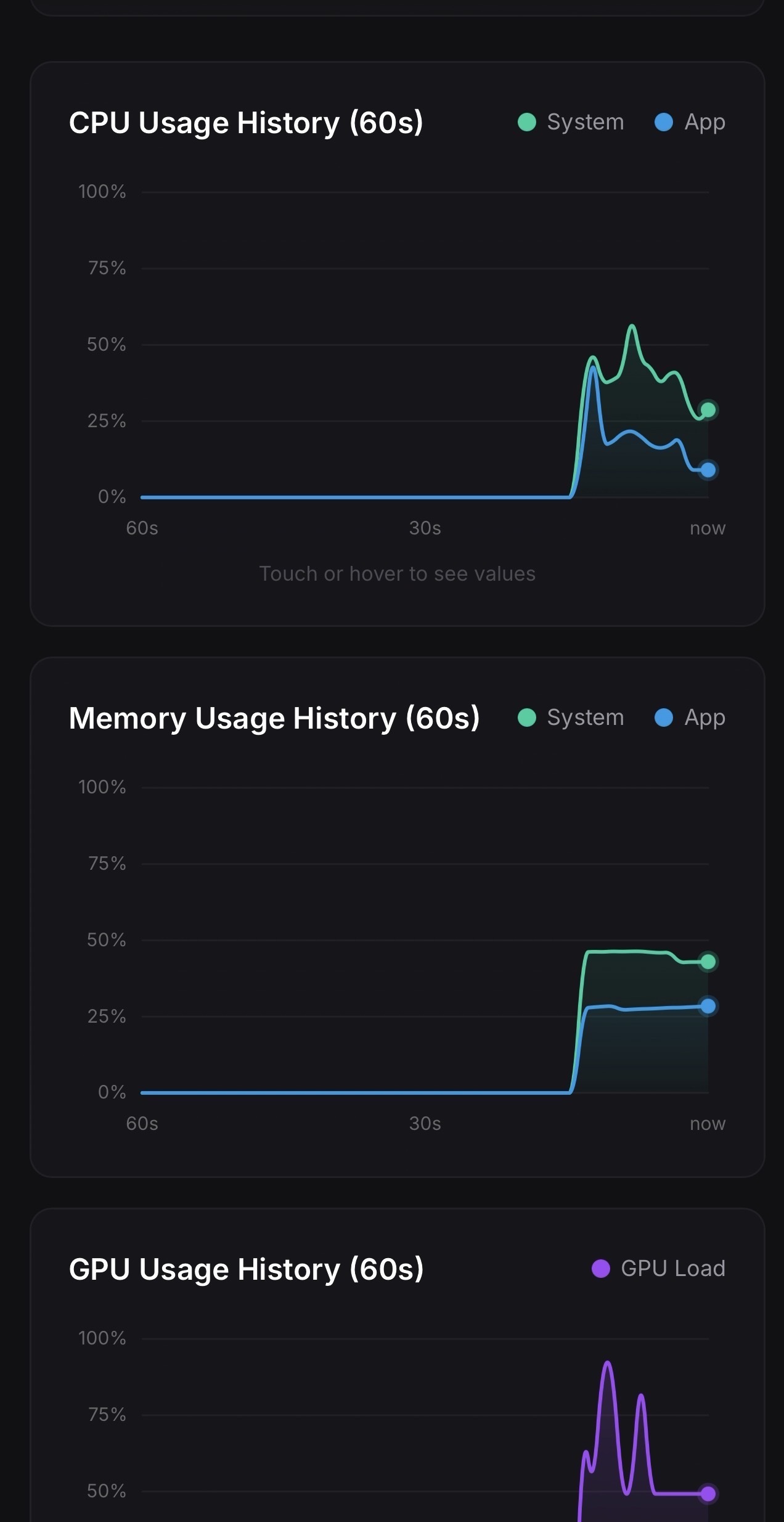
Performance Graph

Performance Graphs

Real-time graphs showing system resource usage over time. Track trends and identify any performance issues.

  • Historical graphs
  • Trend analysis
  • Resource tracking
  • Visual monitoring
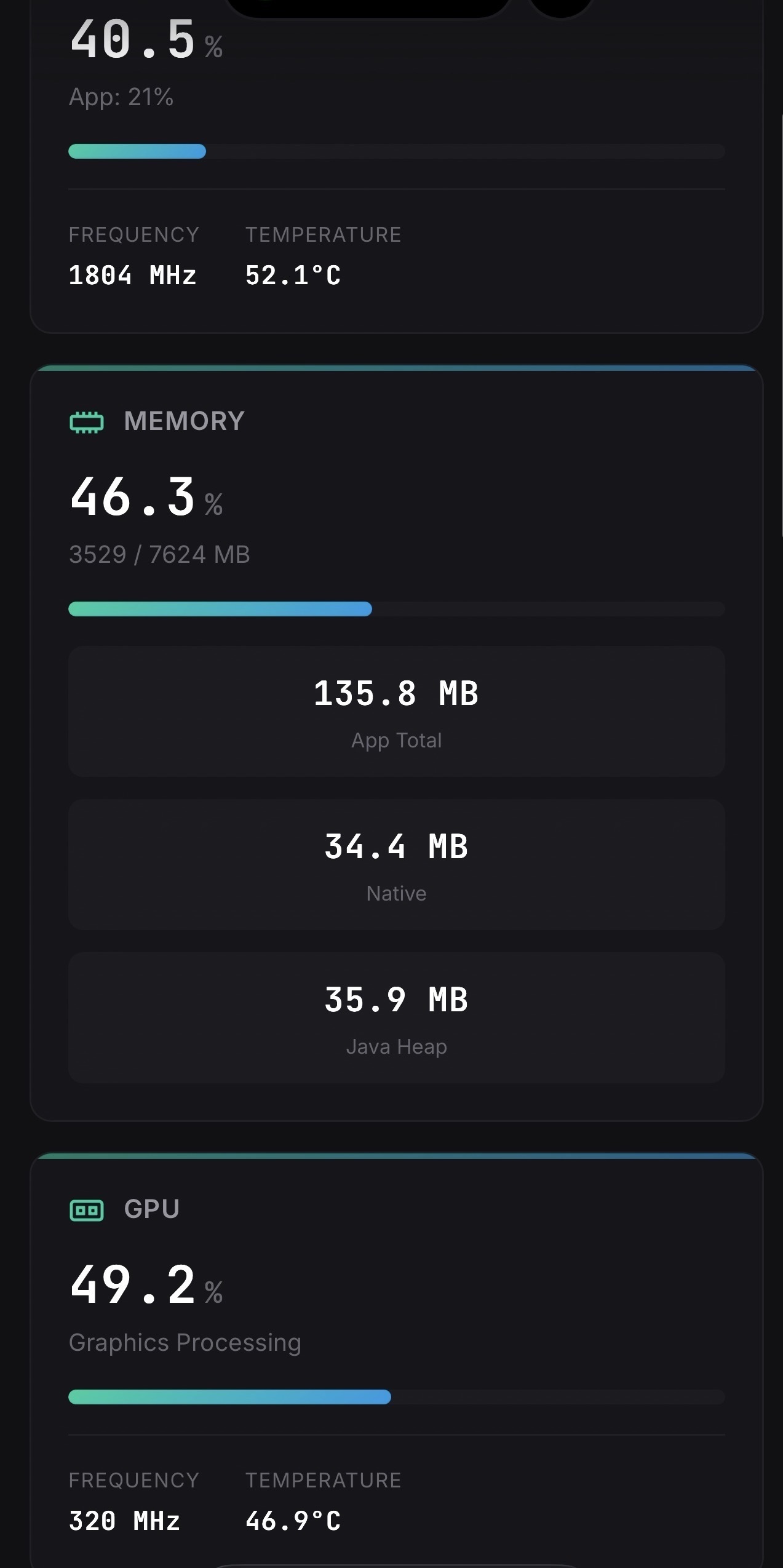
CPU Stats

System Stats

Detailed view of CPU, memory, and system statistics. See exactly what resources your system is using at any moment.

  • CPU usage breakdown
  • Memory statistics
  • Real-time updates
  • Resource optimization
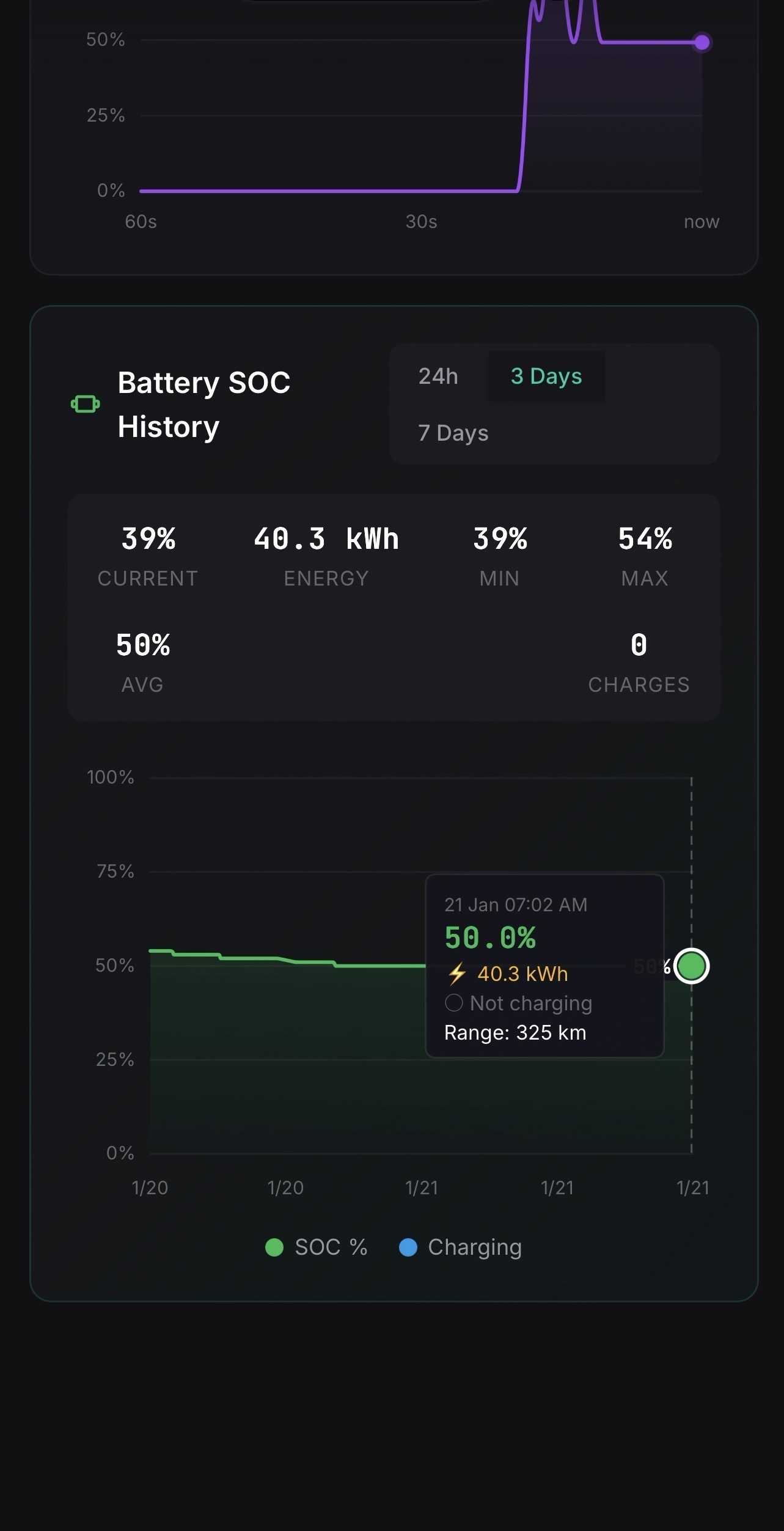
Battery Stats

Battery & Energy Stats

Historical SOC and battery energy graphs. Monitor your EV battery health and charging patterns over time.

  • SOC history tracking
  • Energy consumption graphs
  • Charging pattern analysis
  • Battery health monitoring
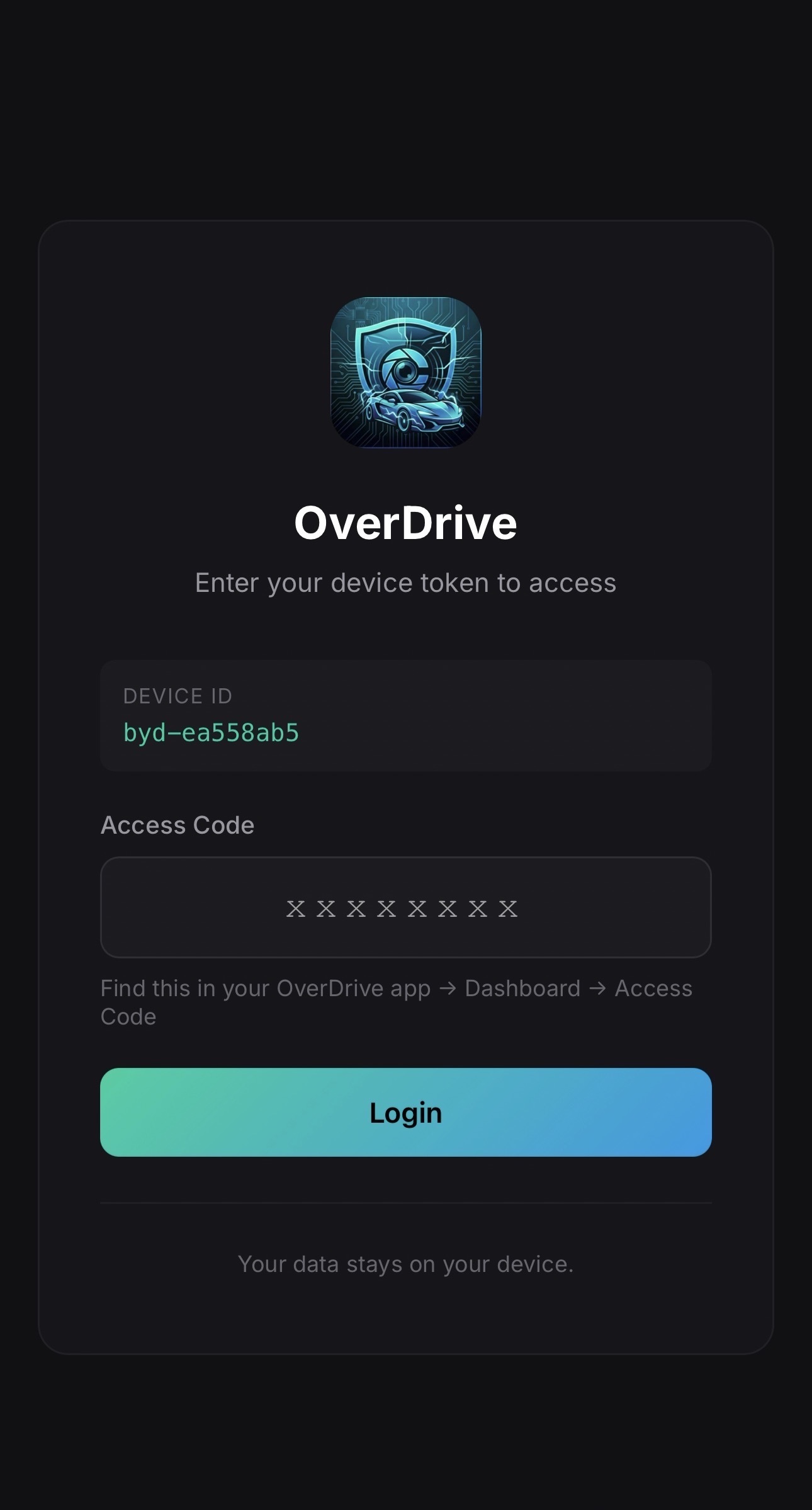
Initial Setup

Easy Setup

Simple token-based setup to get started. Enter your configuration and you're ready to go.

  • Token-based authentication
  • Quick configuration
  • One-time setup
  • Secure connection

Under The Hood

Built with performance and reliability in mind

Recording

  • ResolutionUp to 2560×1920
  • CodecH.264 / H.265 (HEVC)
  • Bitrate2-12 Mbps (configurable)
  • FPS15-30 fps

Performance

  • CPU Usage<28% (optimized)
  • Memory~150MB
  • Latency<100ms streaming
  • Boot Time<3 seconds

AI Detection

  • EngineHardware Accelerated
  • ClassesVehicles, People, Objects
  • ProcessingReal-time
  • AccuracyHigh precision

Compatibility

  • Tested OnBYD Seal (Global)
  • PlatformDiLink v3
  • Android10+ (API 29+)
  • Architecturearm64-v8a

* Should work on all BYD vehicles with DiLink v3 and panoramic camera system

Changelog

What's new in each release

v1.0.0 January 2026

Initial Release

  • 🚀 Optimized Pipeline: <28% CPU usage vs 90%+ competitors
  • 🎯 Market First: Proximity recording using BYD radar sensors
  • 📊 Real-time performance monitor (CPU/Memory)
  • 🛡️ Advanced Sentry Mode with motion detection
  • 🤖 AI-powered object detection
  • ☁️ 3 remote access options (LAN, Cloudflared, Zrok)
  • 📱 Telegram bot notifications
  • 🔧 ADB shell console for developers
  • 🌐 ISP blocklist bypass via BYD SIM
  • 📹 H.265 (HEVC) codec support
  • 📚 Recording library with calendar view

Get OverDrive

Free and open source. Install directly on your BYD's head unit.

Version: 1.0.0 Size: <50 MB Requires: BYD DiLink v3

Tested on BYD Seal (Global). Should work on all DiLink v3 vehicles with panoramic camera.

Download Alpha
Early Alpha Build: This is a very early release intended for testing and feedback. Expect bugs, incomplete features, and potential instability. Use at your own risk and please report issues on GitHub or Discord.
Join Discord View on GitHub